DramaBox works like a short-drama app with a free preview first and paid unlocking later. You usually watch the opening episodes at no cost, then decide whether to continue with coins, rewards, or a subscription. The important part is checking the exact unlock method for the drama you want, because not every plan covers every episode.

How Do You Start Watching on DramaBox?
Getting started is simple, but it is worth slowing down before you pay. DramaBox is built for quick phone viewing, so it is easy to move from one short episode to the next without noticing where the free part ends.
Download the official app
Use the Apple App Store or Google Play rather than a random download link. That gives you the safest route for updates, billing records, account recovery, and subscription management if you decide to spend money later.
You may be able to browse before signing in, but creating or using an account early is the safer choice if you plan to unlock episodes. Purchases, viewing history, and rewards are usually easier to recover when they are tied to an account instead of only to one phone.
Browse or search for a short drama
If you already saw a DramaBox ad or clip, search for the title directly. If you are just looking around, browsing by genre works better because many shows follow familiar short-drama themes such as revenge, romance, family conflict, fantasy, or wealthy romance plots.
Watch the free opening episodes
The free episodes are best treated as a trial, not as proof that the full drama is free. Use them to judge the acting, pacing, translation quality, and whether the cliffhangers are interesting enough to justify paying.
- Stop early if the story already feels repetitive.
- Keep watching if the free episodes make you want the ending and the unlock price looks reasonable.
- Pause before paying if the series has many locked episodes and no clear total cost.
Choose how to unlock the rest
Once the free preview ends, DramaBox may show coins, reward options, a subscription offer, or a mix of these. For one specific drama, coins can be the cleanest choice because you are not signing up for a recurring plan. For regular viewing across several dramas, a subscription may be better only if it actually covers the episodes you want.
How Do You Unlock DramaBox Episodes?
DramaBox episodes are usually unlocked one episode at a time or through a plan that covers eligible content. The available options can vary by region, app version, title, and promotion, so two users may not always see the same choices.
Buy coins
Coins are the most direct way to continue a locked drama. You buy a coin pack through the app, then spend coins on episodes as you watch them.
This works well for occasional viewers who only want to finish one story and do not want a weekly or monthly bill. The risk is that small episode unlocks can add up quickly, especially when a drama has dozens of short locked chapters. Before buying, count roughly how many paid episodes remain and compare that with the coin pack you are considering.
Earn rewards where available
Some users may see rewards such as ad views, check-ins, events, or bonus credits. These can reduce the cost, but they are usually better for patient viewing than for finishing a full drama in one sitting.
- Good fit: you only need a few more episodes or do not mind waiting.
- Poor fit: you want to binge the ending tonight and rewards arrive slowly.
- Check first: expiry dates, daily limits, and whether rewards work on that drama.
Use a subscription that covers the episodes
A subscription can be useful if you watch DramaBox often, but only when the included access matches your habits. Look for wording that explains whether the plan unlocks selected dramas, gives VIP benefits, provides discounts, or still requires coins for certain episodes.
How Much Does DramaBox Cost?
DramaBox cost depends on your region, app store, taxes, promotions, coin pricing, and subscription offers. The app may be free to start, but finishing a drama often requires payment or enough rewards.
Coin pack prices
Coin packs are shown inside the app at checkout, and the exact price can change by country and platform. Do not judge only by the pack price; judge by how many episodes that pack will actually unlock.
A small pack is sensible if you are testing the app or have only a few locked episodes left. If you are halfway through a long drama, repeated small purchases may cost more than expected, so compare larger packs or a subscription before tapping through another cliffhanger.
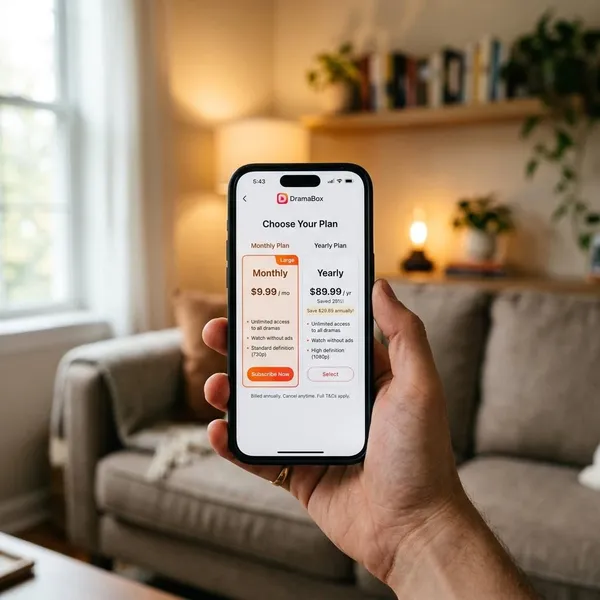
Subscription prices and billing periods
Subscriptions may be offered with different billing periods, such as weekly or monthly plans. A weekly plan can look cheap at first, but it becomes expensive if it renews several times after you stop watching.
| Viewing habit | Option to compare first | Why it matters |
|---|---|---|
| One drama only | Coins | You avoid paying for ongoing access you may not use. |
| Weekend binge | Short subscription or coins | The renewal date matters more than the headline price. |
| Several dramas each week | Subscription | It may save effort if the titles are actually included. |
Total cost to finish a short drama
The real cost is the amount needed to reach the ending, not the first price you see. A drama may start with several free episodes and then lock most of the remaining story.
What Should You Check Before Paying?
The most important check is coverage: will this payment unlock the episodes you actually want to watch? After that, look at renewal terms, reward limits, and the final checkout price.

Which episodes the plan includes
Open the specific drama and check the locked episodes there, not just the sales banner. If episodes still show separate coin prices or unlock prompts, the plan may not fully cover that title.
This is especially important if you are subscribing only to finish one story. A cheaper-looking plan is not good value if the ending still needs separate payment.
Whether the subscription renews automatically
Most mobile subscriptions renew unless you cancel through the billing platform, such as Apple subscriptions or Google Play subscriptions. If you only want temporary access, set a reminder for before the renewal date as soon as you subscribe.
Any limits or expiry dates on rewards
Reward credits may expire, reset daily, apply only to certain episodes, or disappear after an event ends. If you are trying to watch without paying, check whether the reward amount is realistic for the number of locked episodes left.
Rewards are useful as a discount or a slow free path. They are less reliable if you want immediate access to a long series.
The final price on the payment screen
Always read the last payment screen before confirming. Taxes, app store pricing, currency conversion, and expired promotions can make the final charge different from the first offer you saw.
That final screen is also where you should confirm whether you are buying a one-time coin pack or starting a recurring subscription. Mixing those up is one of the easiest ways to spend more than planned.
Conclusion
DramaBox is easiest to enjoy when you treat the free episodes as a preview and the payment screen as a decision point, not just the next step in the story. If you watch rarely, coins or rewards may be enough; if you watch often, a subscription can make sense only after you confirm the exact episodes it covers and when it renews.